
Modern web applications are becoming more dynamic, distributed, and complex. Test automation needs to keep pace with these changes while remaining reliable and maintainable.
For organizations with established Selenium test suites, moving to a new framework is not simply a matter of replacing one set of commands with another. Existing test cases, locators, page objects, synchronization logic, utilities, and reporting workflows all need to be considered.
Selenium to Playwright migration provides a way to modernize an existing automation setup while preserving the value of tests that teams have already built. Playwright introduces capabilities such as built-in auto-waiting, browser context isolation, parallel execution, network interception, and integrated tracing and debugging.
This guide explains why teams consider migrating from Selenium to Playwright, how Playwright compares with Selenium, how the migration process works, and the practices that can help teams transition with less disruption.
Key takeaways
- Selenium and Playwright take different approaches to browser automation. Selenium is a mature framework with broad browser and language support, while Playwright provides an integrated approach to modern web and end-to-end testing.
- Playwright includes built-in capabilities for synchronization and test isolation. Auto-waiting and browser contexts can reduce supporting code for common testing scenarios.
- Parallel execution is built into Playwright Test. Independent tests can run concurrently without relying entirely on external test infrastructure.
- Playwright provides integrated debugging capabilities. Traces, screenshots, videos, and reports can provide more context when investigating failures.
- Selenium remains relevant. Organizations with established Selenium ecosystems may have valid reasons to continue using it.
- Migration can be phased. Teams can start with selected tests, validate the approach, and gradually migrate the remaining suite.
What is Selenium?
Selenium is an open-source framework used to automate web browsers for testing web applications. It allows QA teams to simulate user actions such as clicking buttons, entering data, navigating pages, and validating application behavior across different browsers.
Selenium has been widely adopted because of its:
- Support for multiple browsers
- Support for multiple programming languages
- Large ecosystem and community
- Flexibility for different testing frameworks and environments
However, Selenium provides the core browser automation capability rather than a complete testing solution. Teams often need additional tools and frameworks to handle areas such as test execution, reporting, synchronization, and parallel testing.
What is Playwright?
Playwright is an open-source framework for end-to-end testing and browser automation developed to support modern web applications.
Unlike traditional browser automation approaches, Playwright provides many testing capabilities within a single framework, including:
- Automatic waiting for elements and actions
- Browser context isolation
- Parallel test execution
- Network interception
- Built-in screenshots, videos, and tracing
- Support for Chromium, Firefox, and WebKit
These capabilities are designed to help teams create more reliable automated tests while reducing some of the additional configuration often required in traditional automation setups.
Why are teams comparing Selenium and Playwright?
Selenium and Playwright both support browser automation, but they take different approaches to test automation.
Selenium provides a mature and flexible ecosystem that many organizations have used for years. Playwright takes a more integrated approach, combining browser automation with capabilities designed for modern web application testing.
As testing environments become more complex, teams are evaluating whether their existing automation framework can continue to meet requirements for reliability, execution speed, debugging, and maintenance.
For teams using Selenium, common reasons to consider a Selenium to Playwright migration include:
- Reducing synchronization code through built-in auto-waiting
- Improving test execution through parallel testing
- Isolating tests with independent browser contexts
- Simplifying cross-browser testing
- Improving debugging with built-in tracing, screenshots, and test artifacts
- Handling modern web application workflows more directly
- Reducing maintenance associated with custom test utilities
The decision, however, should be based on the organization’s existing testing environment, framework architecture, browser requirements, and maintenance challenges. Selenium remains a capable option for established test environments, while Playwright may provide a more integrated approach for teams looking to modernize their automation framework.
Playwright vs Selenium for modern test automation
The differences between Selenium and Playwright become clearer when looking at how each handles common test automation requirements.
Selenium
Selenium provides browser automation through WebDriver and supports a broad range of browsers, programming languages, and testing environments.
Its flexibility makes it suitable for organizations with established automation frameworks, existing Selenium infrastructure, or requirements that depend on its broader ecosystem.
However, teams may need to combine Selenium with additional frameworks, libraries, or infrastructure for capabilities such as test orchestration, parallel execution, reporting, and advanced debugging.
Playwright
Playwright combines browser automation with a test framework and provides several capabilities within the same ecosystem.
Its approach includes built-in auto-waiting, browser context isolation, parallel execution, network interception, and tracing. These features are designed to address common requirements in modern end-to-end testing without relying as heavily on additional configuration.
How to migrate Selenium tests to Playwright
A Selenium to Playwright migration should be treated as a phased modernization effort rather than a direct line-by-line conversion.
A mature Selenium suite often contains years of accumulated test logic, page objects, custom utilities, synchronization methods, test data, and CI/CD dependencies. Simply rewriting the same tests in Playwright can carry those existing maintenance problems into the new framework.
A better approach is to first understand the current test suite, establish the Playwright environment, migrate tests in manageable groups, and validate the results at each stage.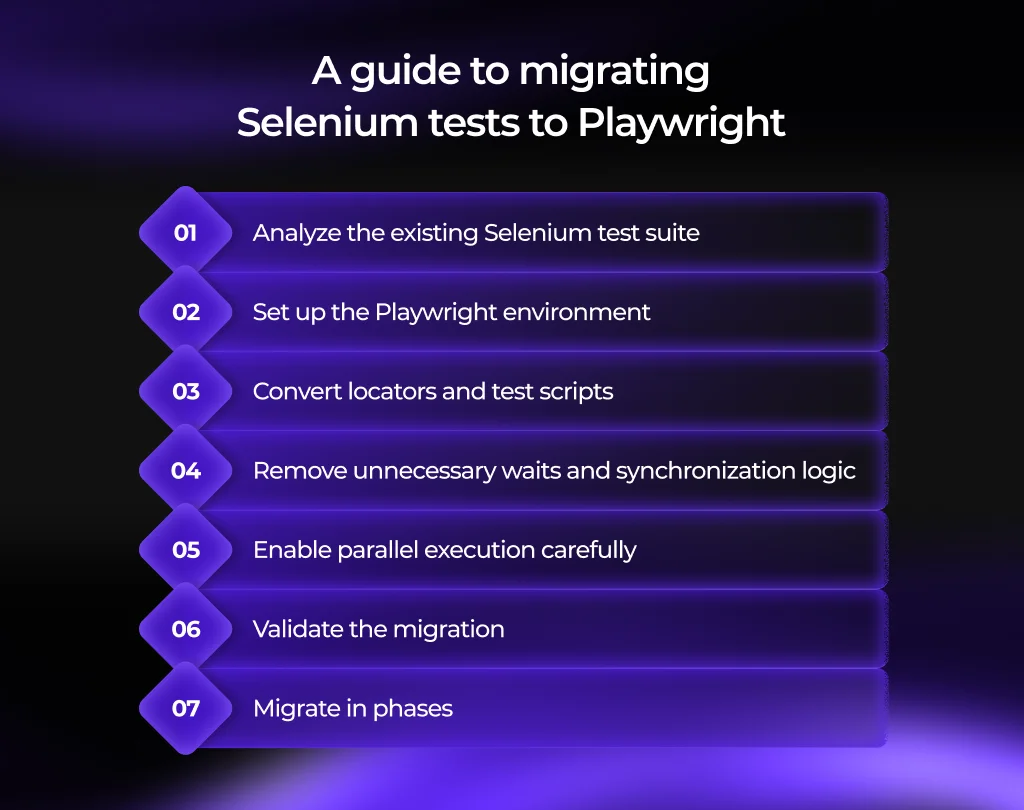
1. Analyze the existing Selenium test suite
Before writing Playwright code, review how the current Selenium framework is structured and how the tests are actually being used.
Look at:
- Test cases and coverage
- Page objects and reusable components
- Locators and selector strategies
- Explicit and implicit waits
- Custom synchronization utilities
- Test data and shared state
- Reporting and logging
- CI/CD integration
- Browser and environment configuration
- Tests that are outdated, duplicated, or no longer provide meaningful coverage
This review helps separate tests that should be migrated from those that should be redesigned, consolidated, or retired.
For example, a team may have hundreds of Selenium tests but discover that some cover the same workflow, depend on outdated application behavior, or are frequently skipped because they are unreliable. Migrating those tests without reviewing them first adds unnecessary work without improving coverage.
2. Set up the Playwright environment
Create and validate the Playwright project before migrating a large portion of the test suite.
Establish the basic testing structure, including:
- Playwright Test
- Supported browsers
- Test environments
- Project and folder structure
- Configuration files
- Reporting
- Test data and environment variables
- CI/CD integration
Run a small number of representative tests through the new setup before starting the broader migration.
This helps identify issues with browser configuration, environments, authentication, reporting, or CI/CD early. The migration can then proceed from a stable foundation rather than troubleshooting framework problems across hundreds of tests.
3. Convert locators and test scripts
Once the environment is ready, begin converting Selenium tests into Playwright tests.
This involves more than replacing Selenium commands with their Playwright equivalents. Review how each test identifies elements, performs actions, handles navigation, and verifies results.
Pay particular attention to locators. Instead of carrying over fragile selectors from the Selenium suite, use reliable locator strategies supported by Playwright, such as user-facing roles, labels, text, or stable attributes where appropriate.
Page objects can also be reviewed during this stage. Existing page objects may still be useful, but their structure should be adapted to the new framework rather than copied line by line.
The goal is to preserve meaningful test coverage while taking advantage of Playwright’s testing model.
4. Remove unnecessary waits and synchronization logic
Selenium suites often contain explicit waits, fixed delays, or custom synchronization utilities that were introduced to handle timing differences between the test and the application.
During migration, review each of these mechanisms instead of automatically carrying them into Playwright.
Playwright provides built-in auto-waiting for many common actions and conditions. This can allow tests to wait for the relevant application state rather than relying on fixed delays.
For example, a test that previously waits for a fixed number of seconds before clicking an element should be reviewed to determine whether Playwright can wait for the element to become actionable instead.
Removing unnecessary synchronization code can make tests easier to read and reduce timing-related failures.
5. Enable parallel execution carefully
After migrated tests are stable, teams can take advantage of Playwright Test’s parallel execution capabilities.
However, simply running more tests at the same time does not automatically make a test suite better. First check whether tests share:
- Test data
- User accounts
- Files or other resources
- Application state
- Database records
- Environment-specific dependencies
Tests that depend on shared state may interfere with one another when executed concurrently.
The objective is to increase execution efficiency while keeping tests independent and reliable. Where necessary, test data and browser contexts should be isolated so that parallel tests do not affect each other’s results.
6. Validate the migration
Migration should be validated continuously rather than only after the entire Selenium suite has been converted.
Where practical, run migrated Playwright tests alongside the existing Selenium tests during the transition. Compare the results across several dimensions:
- Test coverage
- Pass and failure rates
- Execution time
- Flaky test behavior
- Browser coverage
- Test reliability
- Reporting and debugging
- CI/CD execution
Pay particular attention to tests that pass in one framework but fail in the other. The difference may indicate a genuine application issue, a locator problem, a synchronization issue, or a difference in test implementation.
Resolve these issues before migrating the next group of tests.
7. Migrate in phases
Once the initial migration has been validated, continue with additional groups of tests rather than moving the entire suite at once.
A phased migration can begin with tests that:
- Have high business value
- Are frequently executed
- Are relatively stable
- Have clear test coverage
- Would benefit from improved execution or debugging
The team can use lessons from each migration phase to refine its Playwright architecture, locator strategy, test data management, and CI/CD configuration.
Over time, this creates a controlled transition from the existing Selenium framework to Playwright without requiring the entire test suite to be rewritten in a single effort.
Selenium vs Playwright comparison 2026
The Selenium vs Playwright comparison 2026 depends largely on the organization’s existing automation environment and testing requirements.
Both frameworks support browser automation and cross-browser testing, but they take different approaches to the testing experience.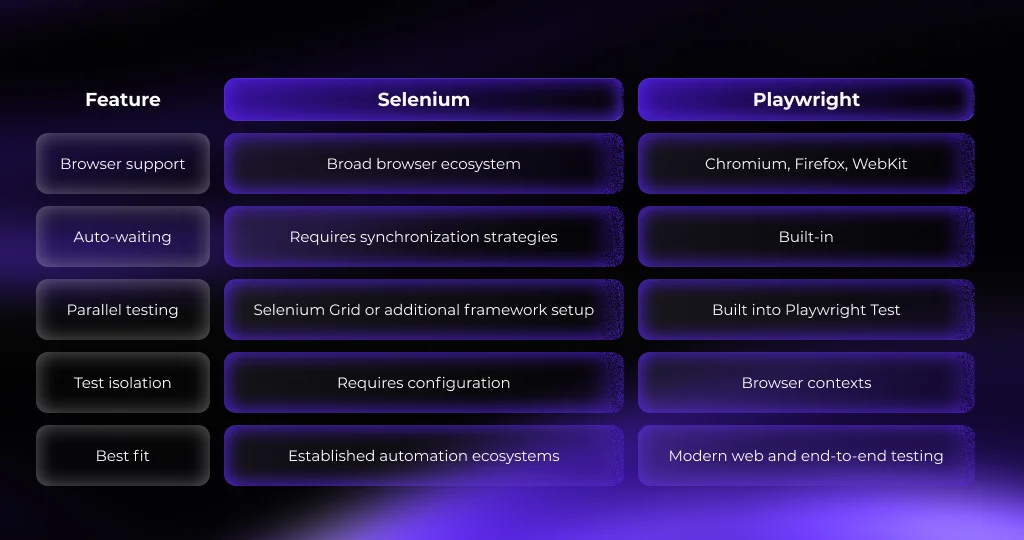
Is Playwright better than Selenium?
Is Playwright better than Selenium? There is no universal answer.
Playwright can be a strong fit for teams building or modernizing end-to-end testing for contemporary web applications, particularly when built-in synchronization, browser isolation, parallel execution, and debugging are important.
Selenium can remain a practical choice for organizations with established automation ecosystems, broad language requirements, and significant existing investment in Selenium-based testing.
The more useful question is whether the framework supports the organization’s testing requirements, development workflow, browser coverage, infrastructure, and maintenance model.
For teams already using Selenium, a phased migration provides a way to evaluate Playwright without immediately replacing the entire automation ecosystem.
Best practices for Selenium to Playwright migration
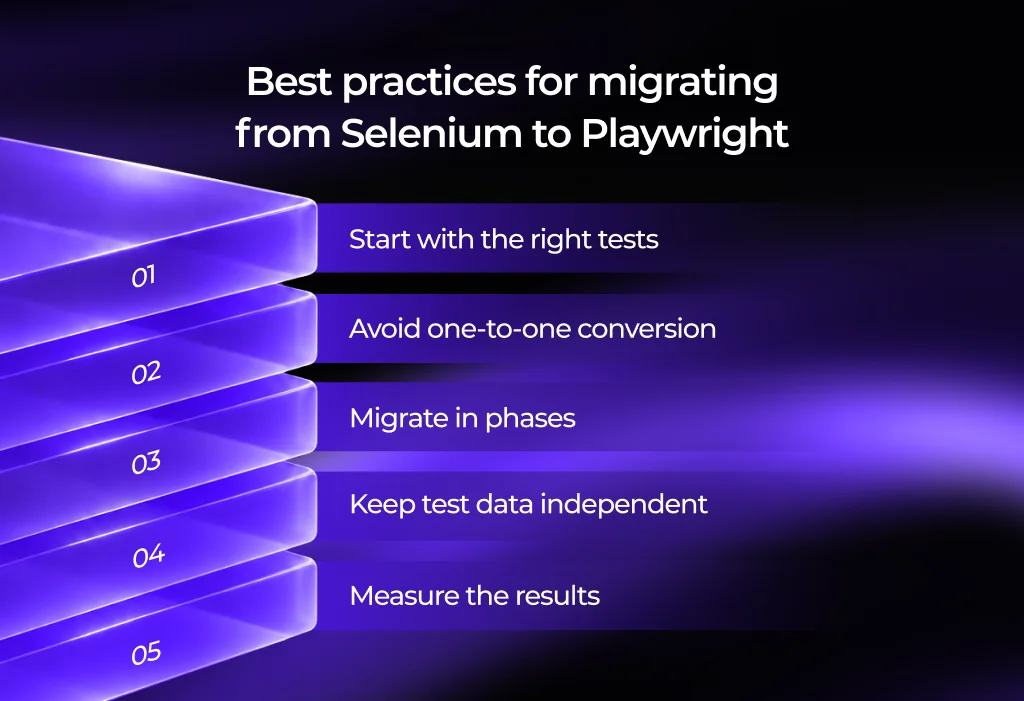
A framework migration can introduce its own risks if the focus is placed only on converting test scripts. A successful Selenium to Playwright migration should also consider test coverage, architecture, maintainability, and team workflows.
1. Start with the right tests
Do not migrate every existing test automatically. Identify tests that are stable, valuable, and representative of the application’s critical workflows.
Tests that are obsolete or consistently provide little value may be better candidates for retirement than migration.
2. Avoid one-to-one conversion
A Selenium test does not always need to be reproduced line by line in Playwright.
Use the migration as an opportunity to simplify unnecessary waits, remove duplicated utilities, improve locators, and take advantage of Playwright’s built-in capabilities.
3. Migrate in phases
Start with a defined group of tests or a specific application area. Validate the approach before expanding the migration.
This limits disruption and allows the team to establish coding standards and migration patterns.
4. Keep test data independent
Parallel execution works best when tests do not depend on shared mutable state.
Where possible, create isolated test data and independent test environments so that one test does not change the conditions another test relies on.
5. Measure the results
The success of a migration should be evaluated using practical engineering metrics rather than the number of scripts converted.
Useful measures include:
- Test execution time
- Flaky test rate
- Test maintenance effort
- Failure investigation time
- Browser coverage
- CI/CD feedback time
- Overall test coverage
Conclusion
Selenium has remained an important part of web test automation because of its maturity, flexibility, and broad ecosystem. Playwright brings a different approach, with more testing capabilities integrated directly into its framework.
For teams considering a Selenium-to-Playwright migration, the decision should start with the current automation environment and the problems the team is trying to solve. A migration can make sense when built-in synchronization, browser isolation, parallel execution, network control, or debugging capabilities address genuine gaps in the existing approach.
The migration itself should also be treated as an engineering project, not simply a conversion of test scripts. Reviewing the existing suite, migrating in phases, validating results, and measuring improvements can help teams modernize their automation without unnecessarily disrupting established testing workflows.
Interested in modernizing your test automation? Explore how Terralogic’s technology expertise can support your goals.
Frequently Asked Questions (FAQs)
1. Why switch from Selenium to Playwright?
Teams may switch to Playwright for built-in auto-waiting, parallel execution, browser isolation, cross-browser testing, and integrated debugging. These features can help improve test reliability and simplify modern web test automation.
2. How do I migrate Selenium tests to Playwright?
Start by reviewing the existing Selenium suite, setting up Playwright, converting locators and test actions, and removing unnecessary waits. Then validate the migrated tests through regression testing. A phased migration can reduce risk and simplify the transition.
3. What are the advantages of Playwright over Selenium?
Playwright advantages over Selenium include built-in auto-waiting, browser context isolation, parallel execution, network interception, and integrated tracing and debugging. These capabilities can make automated testing more reliable and easier to maintain.
4. Is Playwright good for test automation?
Yes. Playwright supports end-to-end testing, parallel execution, cross-browser testing, headless testing, debugging, reporting, and test isolation. It is well suited for modern web application testing.
5. Is Selenium still relevant in 2026?
Yes. Selenium remains relevant, particularly for organizations with established automation frameworks, broad language requirements, and existing Selenium infrastructure. Playwright is an increasingly popular alternative for modern web and end-to-end testing.