

A customer logs into an online banking application and changes the account ID in a URL. Instead of being restricted to their own account, the application returns information belonging to another customer.
The user has successfully authenticated, but the application has failed to verify whether they are authorized to access the requested account. This is an example of broken access control, a vulnerability that can expose sensitive information even when the login system appears to work as intended.
Scenarios like this show why securing a web application requires more than checking whether it has known vulnerabilities or whether its authentication mechanisms are functioning correctly. Attackers can exploit weaknesses in application logic, access controls, session management, and data handling to reach information or functions they should never be able to access.
Web application penetration testing helps organizations identify these weaknesses by examining an application from an attacker’s perspective. Rather than relying solely on automated scans, testers manually investigate the application’s functionality, validate potential vulnerabilities, and determine how they could affect real users and business operations.
This guide explains what web application penetration testing involves, why it matters, and how a typical assessment is conducted. It also covers the OWASP Top 10:2025, the differences between black-box, grey-box, and white-box testing, and what organizations should consider when selecting a penetration testing provider.
What is web application penetration testing?
Web application penetration testing is a security assessment in which specialists simulate attacks against a web application to identify and validate vulnerabilities. The assessment focuses on the application’s own security mechanisms, including authentication, access control, session management, input handling, and business logic.
This focus distinguishes a web application pentest from a general network penetration test. A network assessment examines weaknesses in infrastructure, network services, and connected systems. A web application pentest examines how the application itself processes information and enforces security rules.
The scope may include customer-facing websites, internal business applications, web portals, and APIs. The specific areas tested depend on how the application is built, what information it handles, and which functions are most important to the business.
For example: testing an e-commerce platform may involve examining customer account permissions, shopping cart behavior, payment processing, and order management. For a financial application, testers may pay particular attention to authentication, transaction authorization, and the protection of financial information.
Web application penetration testing vs. vulnerability scanning
Vulnerability scanning and web application penetration testing are often used together, but they serve different purposes. Understanding the distinction helps organizations determine whether they are simply identifying potential weaknesses or assessing how those weaknesses could be exploited.
Vulnerability scanning uses automated tools to identify known vulnerabilities and suspicious configurations. It is useful for checking applications at scale, but its findings are potential weaknesses that may require further investigation.
Web application penetration testing goes further by examining whether those weaknesses can be exploited and what an attacker could achieve. Testers manually investigate the application’s behavior through activities such as:
- Manipulating requests: Changing parameters or inputs to identify weaknesses in how the application processes data.
- Testing access permissions: Checking whether users can access records, functions, or information beyond their assigned permissions.
- Examining application logic: Investigating how different features interact and whether unexpected workflows can be abused.
- Validating vulnerabilities: Confirming whether potential weaknesses are exploitable and assessing their actual impact.
Consider an application that allows customers to view their account information through a URL containing an account ID.
- An automated scanner may not flag the endpoint because it responds normally and does not match a recognizable vulnerability signature.
- A penetration tester may change the account ID and discover that the application returns another customer’s information without verifying account ownership.
This is a broken access control vulnerability. The underlying issue lies in the application’s authorization logic, rather than necessarily in its software components or infrastructure.
The distinction is important because each approach provides a different level of insight:
- Scanning identifies potential weaknesses based on known vulnerability patterns and predefined checks.
- Penetration testing validates exploitability by investigating how the application behaves under real attack scenarios.
- Scanning supports ongoing monitoring, while penetration testing provides a deeper, time-bound assessment of application security.
Neither approach replaces the other. Vulnerability scanning helps organizations maintain visibility into known technical weaknesses, while penetration testing reveals how application flaws could be abused in practice. A clean scan result alone does not establish that an application is secure.
Why web application penetration testing matters
Web applications are no longer isolated digital touchpoints. They often connect customers, employees, business partners, databases, payment systems, and third-party services. A security weakness in one application can therefore affect more than the application itself.
For security leaders, the priority is understanding what an attacker could access or disrupt if an application were compromised. 3 considerations make this assessment particularly important.
1. Application vulnerabilities can expose business-critical data and functions
Web applications frequently handle information that organizations cannot afford to expose, including customer records, financial transactions, employee information, and proprietary business data.
The risk goes beyond unauthorized access. If an application does not enforce its security rules correctly, attackers may also manipulate transactions, misuse account privileges, or interfere with business processes.
Consider these scenarios:
- Customer data exposure: A customer portal allows users to view or modify another customer’s personal information by changing an account ID.
- Unauthorized transactions: A banking application fails to verify transaction ownership, allowing a user to access or manipulate transactions belonging to someone else.
- Privilege abuse: An ordinary user discovers a way to access administrative functions that should be restricted to authorized personnel.
These weaknesses can lead to data exposure, financial loss, and disruption to business operations.
Penetration testing examines whether application permissions and security controls work as intended. A successful login only confirms a user’s identity. It does not guarantee that the application properly restricts what that user can access or do.
2. Automated security tools cannot understand every application workflow
Automated scanners are effective at identifying known vulnerability patterns, but they cannot fully understand how an application is expected to function.
Some weaknesses only become visible when different features, user roles, and transaction steps interact. Identifying them requires testers to understand legitimate application behavior and investigate whether users can perform actions beyond their permissions.
For example, consider an online payment platform that allows customers to request refunds. A weakness in its transaction logic could create several risks:
- Repeated refund requests: A user submits the same refund request multiple times, potentially receiving more money than they are entitled to.
- Unauthorized actions: A user manipulates a request to perform an action that should only be available to another account or role.
- Workflow manipulation: A user changes the order of transaction steps to bypass a required approval or validation process.
These issues may not match known vulnerability signatures because they arise from how the application handles its own business processes.
Manual penetration testing helps uncover these weaknesses by examining application workflows, testing different user roles, and checking how the system responds to unexpected actions.
3. Application security affects customer trust and business relationships
Security assurance is increasingly part of how enterprise customers evaluate technology providers. Before adopting a SaaS platform or connecting an external application to their systems, customers may request evidence of security testing, vulnerability management, and remediation practices.
Without this evidence, a company may face additional scrutiny during procurement and third-party risk assessments.
Consider a B2B SaaS provider going through an enterprise customer’s security review:
- Security documentation is requested: The customer asks for a recent web application penetration testing report.
- No recent assessment is available: The provider can explain its security controls but cannot demonstrate that its application has been independently tested.
- The review faces additional scrutiny: The customer may request further assessments or remediation evidence before approving the partnership.
The absence of a penetration testing report does not automatically mean an application is vulnerable. However, it makes it harder for the provider to demonstrate that its security has been properly assessed.
The 6 phases of web application penetration testing
A professional web application pentest should follow a defined methodology. The process needs to establish clear testing boundaries, understand the application, identify potential weaknesses, validate those findings, and provide a path toward remediation.
The following six phases describe a typical engagement. The exact activities may vary depending on the application, its architecture, and the objectives agreed upon with the testing provider.
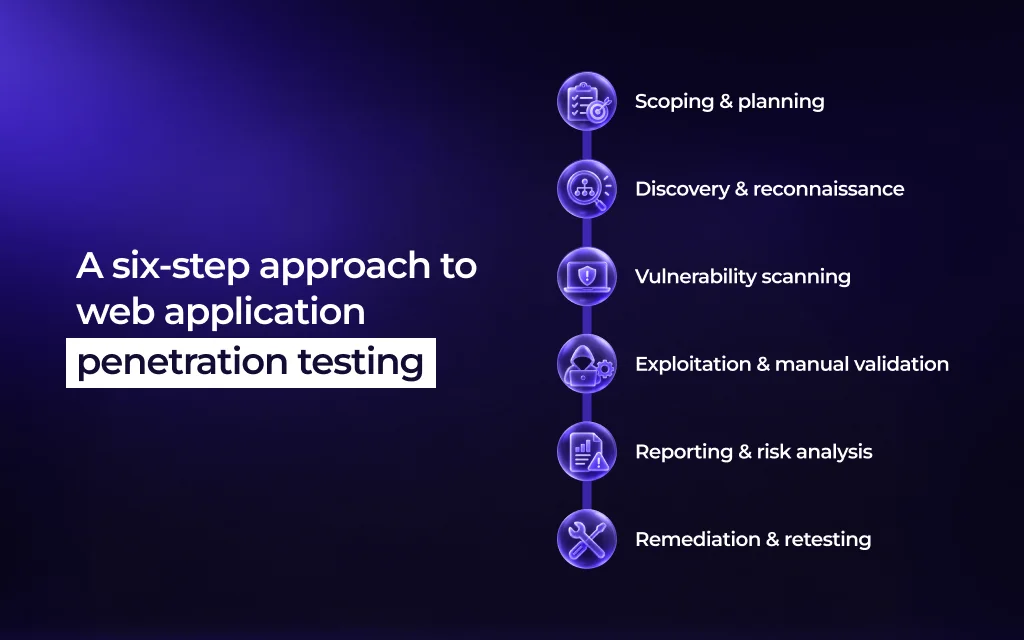
1. Scoping and planning
Testing begins with defining what needs to be assessed and establishing the conditions under which the work will take place. This is particularly important for applications that support live business operations, where uncontrolled testing could affect users or interrupt services.
The organization and testing provider agree on the target applications, domains, APIs, user roles, and environments included in the assessment. They also establish the testing approach, permitted techniques, testing windows, and operational restrictions.
The scope should be specific enough to prevent important application components from being overlooked. For example, testing only the public login page would not provide meaningful coverage of an application that also includes customer dashboards, administrative functions, and payment workflows.
Key output: An agreed scope of work and rules of engagement.
2. Discovery and reconnaissance
Once the scope is confirmed, testers examine the application to understand its structure and identify potential entry points. This involves mapping the available functionality, endpoints, user roles, and workflows before attempting to exploit weaknesses.
The process may include identifying API endpoints, examining how authentication works, reviewing accessible services, and understanding how different user roles interact with the application.
This stage is important because the visible interface does not always represent the full application attack surface. An application may contain administrative endpoints, background functions, or API operations that are not immediately accessible through its main navigation.
For example, a business application may provide separate interfaces for customers, support staff, and administrators. Mapping these roles helps testers understand which functions should be available to each group and where access control weaknesses may exist.
Key output: An application attack-surface map and asset inventory.
3. Vulnerability scanning
After identifying the application’s attack surface, testers use automated tools to check for known vulnerabilities and common security weaknesses.
Depending on the application and scope, scanning may examine input fields, application components, exposed endpoints, security configurations, and other areas that can be assessed through automated checks.
A scanner may flag a login endpoint as potentially vulnerable to SQL injection because of unusual response behavior. However, this is not yet proof that the application can be exploited. The finding needs to be investigated to determine whether user input can influence database queries.
This distinction matters because automated tools can generate false positives or identify conditions that appear suspicious but cannot be exploited in the actual environment. Treating every scanner alert as a confirmed vulnerability can lead to inaccurate risk assessments and wasted remediation effort.
Key output: A list of potential vulnerabilities requiring manual validation.
4. Exploitation and manual validation
This is the stage where penetration testing moves beyond detection and investigates what an attacker could actually achieve.
Testers manually examine potential vulnerabilities and attempt controlled exploitation within the agreed scope. They may manipulate requests, test authorization boundaries, submit crafted inputs, or combine weaknesses to understand whether an attack path exists.
Returning to the SQL injection example, a tester may construct specific inputs to determine whether the application processes user data securely. If the weakness is confirmed, the tester can demonstrate its potential impact using controlled techniques and within the agreed testing boundaries.
Manual testing also investigates issues that automated scanners may not recognize, particularly flaws involving business logic, complex workflows, and interactions between different user roles.
The objective is not to exploit as many vulnerabilities as possible. It is to establish which weaknesses are genuine, understand their potential consequences, and provide sufficient evidence for the organization to assess the risk.
Key output: Confirmed vulnerabilities, supporting evidence, and severity assessments.
5. Reporting and risk analysis
Once testing is complete, the provider documents the findings in a penetration testing report. This report should give decision-makers a clear understanding of the application’s security weaknesses while providing technical teams with enough information to investigate and fix them.
A useful report generally contains an executive summary, assessment scope, testing methodology, confirmed vulnerabilities, supporting evidence, severity ratings, and remediation recommendations.
Severity ratings may use the Common Vulnerability Scoring System (CVSS) as a reference. However, the technical score should be considered alongside the affected asset, application exposure, data sensitivity, and potential business impact.
For example, a vulnerability that allows unauthorized access to customer financial information may require more urgent attention than a lower-impact configuration issue. The report should make this distinction clear so that remediation efforts can be directed toward the most significant risks.
Key output: A penetration testing report containing confirmed findings and actionable remediation guidance.
6. Remediation and retesting
The engagement should continue after the report is delivered. The organization’s development and security teams need to address the identified weaknesses, while the testing provider should verify whether the corrective actions have resolved them.
Remediation may involve changing application code, strengthening authorization checks, updating software components, or modifying security configurations. The appropriate fix depends on the underlying cause of each vulnerability.
Retesting is necessary because a proposed fix does not automatically guarantee that the original issue has been resolved. A change may also introduce unintended behavior elsewhere in the application.
For example, a development team may update an authorization check to prevent users from viewing other customers’ records. During retesting, the provider verifies that unauthorized access is blocked while legitimate users can still retrieve their own information.
Key output: Verified remediation and evidence that identified vulnerabilities have been addressed.
What OWASP Top 10:2025 means for web application security
The OWASP Top 10 is a widely recognized reference for understanding common web application security risks. Its 2025 edition updates the previous list and reflects changes in the application security landscape.
For organizations commissioning a web application penetration test, OWASP provides a useful foundation for defining testing coverage and organizing findings. It gives security teams and application owners a common language for discussing weaknesses across different applications.
The categories cover several areas that testers should consider when assessing an application’s security.
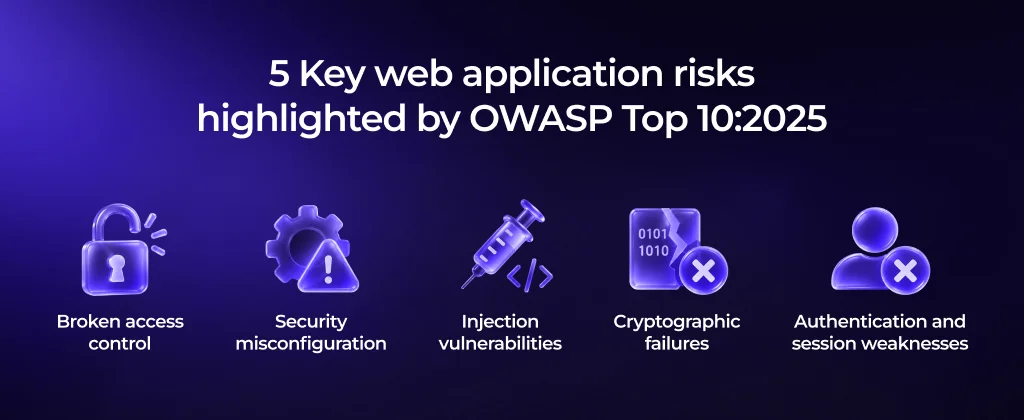
1. Broken access control
Access control determines what users are allowed to see and do within an application. When these restrictions are not properly enforced, users may access other people’s information, modify resources they do not own, or perform administrative actions without authorization.
For example, a customer changes an account identifier in a URL and gains access to another customer’s information. The application may have authenticated the user correctly, but it has failed to verify whether that user is authorized to access the requested account.
2. Security misconfiguration
Security misconfiguration occurs when an application or its supporting environment contains insecure settings. This may include exposed administrative interfaces, unnecessary services, insecure default configurations, or improperly configured security controls.
For example, an application may expose detailed error messages that reveal internal file paths, software versions, or other technical information. Although this may not directly provide access to sensitive data, it can give attackers useful information about the environment.
3. Injection vulnerabilities
Injection vulnerabilities occur when an application processes untrusted input in a way that allows it to interfere with commands or queries. SQL injection is one example, where improperly handled user input can alter the database queries executed by an application.
For example, an attacker may submit specially crafted input through a search field to manipulate the underlying database query. Depending on the vulnerability and the application’s permissions, this could expose or modify information that should remain protected.
4. Cryptographic failures
Cryptographic failures involve weaknesses in how an application protects sensitive information. These may include inadequate encryption, insecure storage of sensitive data, or improper handling of cryptographic keys.
For example, an application that transmits sensitive customer information without appropriate transport encryption may expose that information to interception.
5. Authentication and session weaknesses
Authentication verifies a user’s identity, while session management controls how that user’s access is maintained during an interaction with the application.
Weaknesses in these mechanisms can allow attackers to compromise accounts, misuse active sessions, or bypass security controls.
For example, an application that does not properly invalidate a session after logout may allow a previously obtained session token to remain usable.
Black-box vs. grey-box vs. white-box penetration testing
The testing approach also determines how much information a penetration tester receives before the assessment begins. Black-box, grey-box, and white-box testing differ mainly in the level of access and internal knowledge provided.
Choosing between them requires understanding what the organization wants to evaluate. The best approach depends on whether the priority is to simulate an external attacker, examine authenticated user access, or investigate the application more deeply.
1. Black-box penetration testing
In black-box testing, the tester starts with little or no internal knowledge of the application. The assessment is conducted from an external perspective, with the tester identifying accessible entry points and investigating potential weaknesses without access to internal documentation or source code.
This approach is useful when an organization wants to understand what an external attacker could discover and exploit through the application’s exposed interfaces.
However, limited initial information can make it more difficult to examine deeper application functions within a fixed testing period. Some authenticated workflows or less visible endpoints may receive less attention if they are not discovered during reconnaissance.
2. Grey-box penetration testing
Grey-box testing provides the tester with partial information about the application. This may include a standard user account, selected technical documentation, or limited details about the application’s architecture.
The approach allows testers to investigate weaknesses from the perspective of someone who already has some level of access. It is particularly useful for examining authorization controls, user privileges, and whether an authenticated account can access functions beyond its intended permissions.
Grey-box testing is a practical option for many commercial web application assessments because it combines realistic user access with the opportunity to investigate deeper application behavior.
3. White-box penetration testing
White-box testing gives the tester extensive information about the application, potentially including source code, architecture documentation, and details about its internal components.
This access allows specialists to examine how security controls are implemented and investigate potential weaknesses in application logic. It can also make testing more efficient because testers can focus on relevant code paths rather than spending as much time discovering the application structure.
However, white-box testing requires the organization to provide access to sensitive technical information and coordinate with the relevant development teams.
How to choose a web application penetration testing provider
Selecting a penetration testing provider requires more than comparing prices or looking at the number of vulnerabilities identified in previous engagements. Organizations need to understand how the assessment will be conducted, whether findings will be manually validated, and what support is available after the report is delivered.
The following considerations can help security leaders evaluate potential providers.
1. Review the testing methodology
A provider should be able to explain its methodology from initial scoping through remediation and retesting. This includes how the team maps the application attack surface, identifies potential weaknesses, validates findings, and evaluates their impact.
Ask how the provider incorporates relevant standards such as the OWASP Top 10:2025 and whether the assessment includes manual investigation of application-specific business logic.
A clear methodology also helps establish what the engagement will and will not cover. Without an agreed scope, organizations may assume that certain applications, APIs, or user roles have been tested when they were not included in the assessment.
2. Confirm that findings are manually validated
Automated tools can identify potential vulnerabilities, but they may also generate false positives or flag issues that cannot be exploited in the actual environment.
A penetration testing provider should investigate relevant findings manually and provide evidence to support confirmed vulnerabilities. This is particularly important for application-level issues involving access control, authentication, and business logic.
A report containing only scanner-generated alerts does not provide the same assurance as one that demonstrates how weaknesses were validated and what an attacker could achieve.
3. Evaluate the quality of the penetration testing report
The report should be useful to both technical teams responsible for fixing vulnerabilities and business stakeholders who need to understand the associated risks.
A credible report generally includes:
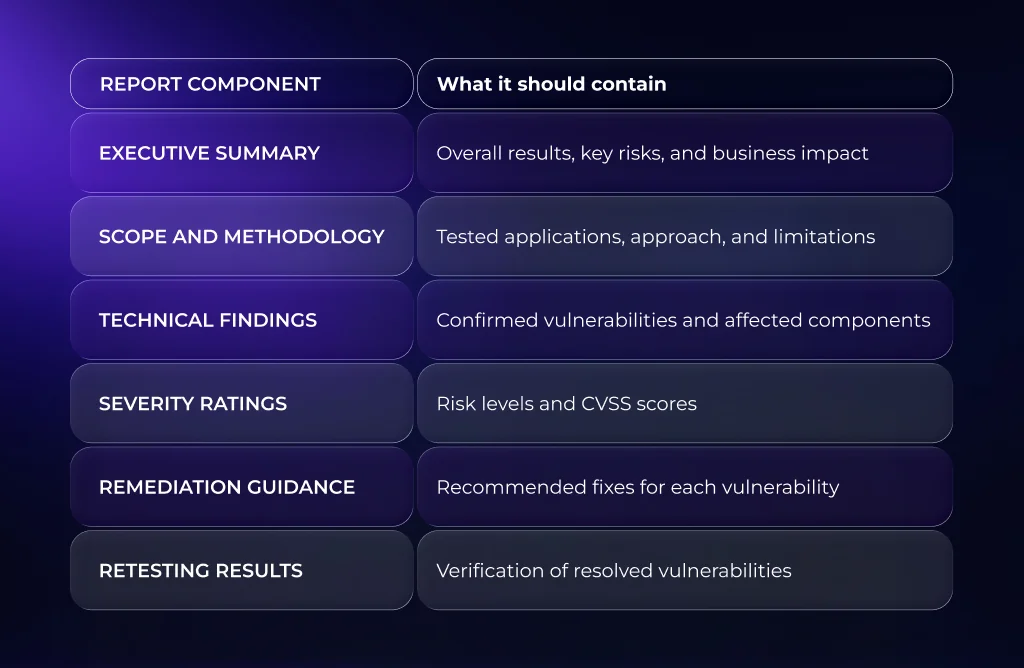
A good report should explain why a finding matters, not simply assign it a severity rating. It should give development teams enough technical detail to investigate the root cause and implement an appropriate fix.
4. Confirm the remediation and retesting process
A penetration test should support the organization’s remediation process rather than end with the delivery of a report.
Before selecting a provider, clarify how follow-up testing is handled, whether retesting is included in the engagement, and what evidence will be provided to confirm that vulnerabilities have been resolved.
This matters because a proposed fix does not automatically guarantee that the original weakness has been addressed. For example, a development team may modify an authorization check to prevent unauthorized access to customer records, but the fix needs to be tested against the original attack scenario.
Retesting provides a way to verify the correction and identify any remaining weaknesses.
5. Look for application security expertise
Different applications have different architectures, workflows, and security requirements. A provider should be able to adapt its testing approach to the technologies and business functions being assessed.
Testing an online banking platform, for example, requires attention to authentication, authorization, transaction processing, and sensitive financial information. A content management system may have different priorities involving administrative access, plugins, and content permissions.
The provider should understand these differences and define a scope that reflects the application’s actual risk profile.
An organization should also be able to discuss the testing objectives with the provider before the engagement begins. This helps ensure that the assessment focuses on meaningful security questions rather than simply running a standard set of checks against every application.
How Terralogic delivers web application penetration testing
Web application security requires more than identifying known vulnerabilities. Organizations need to understand how their applications handle user access, process information, and respond to potential attack techniques.
Terralogic delivers web application penetration testing under its Threat and Vulnerability Management services. The engagement is designed to help organizations identify security weaknesses, validate findings, and understand the potential impact on their applications.
Testing can be scoped around the organization’s objectives and application architecture, with the assessment approach defined according to the available information and the scenarios that need to be evaluated. This allows the engagement to focus on the application’s relevant attack surface rather than relying on a generic testing scope.
The findings provide technical teams with a basis for remediation and help decision-makers understand where application security improvements are needed.
For organizations evaluating their application security, explore Terralogic’s Threat and Vulnerability Management services or talk with Terralogic’s cybersecurity experts about scoping a web application penetration test.
Conclusion
Web application security cannot be evaluated by checking for known vulnerabilities alone. Weaknesses in access controls, application logic, and transaction workflows can expose sensitive data or allow unauthorized actions, even when an application appears to function normally.
Web application penetration testing helps organizations understand how these weaknesses could be exploited and what their consequences might be. However, the value of an assessment does not end with identifying vulnerabilities. Organizations need to prioritize findings based on business impact, implement appropriate fixes, and conduct retesting to verify that the issues have been resolved.
For decision-makers, the goal should be to make application security an ongoing part of risk management, rather than a one-time technical exercise. Regular testing, particularly after significant application changes, helps ensure that security controls continue to work as the application evolves.
Terralogic’s Threat & Vulnerability Management services help organizations assess their security exposure and make informed decisions about addressing vulnerabilities. Explore our cybersecurity services to understand how a structured security assessment can support your application security strategy.
Frequently asked questions (FAQs)
1. What is web application penetration testing?
Web application penetration testing is a security assessment in which specialists simulate controlled attacks against a web application to identify and validate vulnerabilities. It examines areas such as authentication, access control, session management, input handling, and application logic to determine what an attacker could realistically achieve.
2. How long does a web application pentest take?
A web application penetration test may take one to three weeks, depending on the application’s size, complexity, scope, and testing approach. Black-box, grey-box, and white-box assessments may require different levels of preparation and investigation. Additional time may also be needed for remediation and follow-up retesting.
3. How often should a web application be pentested?
Organizations should consider testing web applications at least annually and after significant changes, such as major feature releases, authentication updates, new integrations, or substantial changes to application architecture. The appropriate frequency also depends on the application’s criticality, exposure, regulatory requirements, and overall risk profile.
4. What’s the difference between a web app pentest and vulnerability scanning?
Vulnerability scanning uses automated tools to identify potential security weaknesses across an application. It provides broad coverage and can be performed regularly to detect known vulnerabilities.
A web application penetration test involves manual investigation and controlled exploitation to determine whether weaknesses are genuinely exploitable and what impact they could have. It can also uncover application-specific business logic flaws that automated scanners may not recognize.
Both activities are useful, but they provide different levels of security insight.