
A vulnerability that remains undetected can become an entry point into an organization’s IT environment. The challenge is that weaknesses rarely exist in one place. They can appear across networks, applications, operating systems, cloud infrastructure, container images, and even the configuration files used to deploy new systems.
As IT environments become more distributed, manually checking every asset for security weaknesses is no longer practical. Organizations need a repeatable way to identify potential vulnerabilities across their environments and determine which ones require attention.
This is where vulnerability scanning plays an important role. By using automated tools to examine systems against known vulnerabilities and security configuration baselines, organizations can identify weaknesses before they are exploited. However, running a scan is only one part of the process. Its value depends on whether the findings are accurate, properly prioritized, and followed by remediation.
This article explains what vulnerability scanning is, how the process works, and the main types of scanning organizations should understand. It also examines authenticated and unauthenticated scanning, how often scans should be performed, and how scanning fits into broader vulnerability management and penetration testing activities.
What Is Vulnerability Scanning?
Vulnerability scanning is an automated process used to identify known security weaknesses across an organization’s IT environment. It examines systems, applications, networks, software components, and infrastructure configurations to detect conditions that could expose them to security threats.
A vulnerability scanner compares information gathered from target assets against vulnerability databases, such as the Common Vulnerabilities and Exposures (CVE) catalog, vendor security advisories, and predefined security configuration benchmarks.
Depending on the scanning tool and its configuration, it can identify issues such as:
- Missing security patches and outdated software versions.
- Open ports and exposed network services.
- Known vulnerabilities in operating systems and applications.
- Weak or insecure configuration settings.
- Vulnerable software dependencies and container images.
- Cloud and infrastructure configuration weaknesses.
Unlike a manual security review that relies on specialists examining individual systems, automated vulnerability scanning can assess large numbers of assets within a much shorter period. This makes it useful for organizations that need to maintain visibility across environments that change frequently.
For example: A security team can configure an external vulnerability scanner to examine its public IP address ranges overnight. The scan may identify exposed services, outdated software, and missing security patches across hundreds of internet-facing assets. Reviewing the same environment manually would require considerably more time and resources.
However, vulnerability scanning does not prove that every detected weakness can be exploited. It identifies potential security issues based on available information and scanning techniques. Further validation may be necessary to understand their actual impact.
It is also important to distinguish vulnerability scanning from vulnerability management. Scanning identifies weaknesses, while vulnerability management provides the broader process for assessing, prioritizing, remediating, and monitoring them.
Why Vulnerability Scanning Matters in 2026
As organizations expand their IT environments, keeping track of security weaknesses becomes increasingly challenging. New software vulnerabilities emerge regularly, while existing systems may continue running outdated applications, unsupported software, or configurations that have not been reviewed.
For security teams, the challenge is not simply knowing that vulnerabilities exist. It is identifying which systems are affected, understanding the potential risks, and addressing weaknesses before attackers can exploit them.
Two factors make vulnerability scanning an essential part of this process.
1. Growing Numbers of Vulnerabilities Make Manual Tracking Difficult
Organizations rely on a wide range of software, applications, operating systems, and infrastructure components. Each may introduce different security weaknesses, making it difficult to monitor vulnerabilities across the entire environment manually.
When a new vulnerability is disclosed, security teams need to determine whether the affected software is present in their environment and which systems may be exposed.
Without regular scanning, this process can become slow and inconsistent. Vulnerable assets may go unnoticed, particularly in large environments where software versions and configurations change frequently.
Automated vulnerability scanning helps security teams identify known weaknesses across multiple systems, giving them a clearer view of potential exposure and a basis for prioritizing remediation.
2. Delayed Detection Gives Attackers More Opportunities
Identifying a vulnerability is only useful if the organization has enough time to address it before attackers take advantage of the weakness.
When vulnerabilities remain undetected, security teams may not know which systems require immediate attention. This creates opportunities for attackers to exploit outdated software, unpatched systems, or insecure configurations.
For example: An organization that scans its internet-facing systems only once every quarter may overlook a newly introduced vulnerability for weeks or months. During that time, an attacker could discover the exposed system and attempt to exploit the weakness.
Regular vulnerability scanning helps reduce this visibility gap by identifying potential issues more frequently. However, detection alone is not enough. Organizations also need a clear process to evaluate findings, prioritize critical weaknesses, and coordinate remediation.
Ultimately, vulnerability scanning helps organizations move from reacting to known security issues toward identifying and addressing weaknesses more consistently. The value lies not in how many vulnerabilities a scan detects, but in how effectively the organization responds to them.
Authenticated vs. Unauthenticated Scanning
One important decision when configuring a vulnerability scanning program is whether to use authenticated or unauthenticated scans.
Both methods help identify security weaknesses, but they examine systems from different perspectives. Understanding this distinction is important because relying on only one method can leave significant visibility gaps.
What Is Authenticated Vulnerability Scanning?
Authenticated scanning uses valid credentials to access a target system during the assessment. This allows the scanner to examine information that would not normally be visible from an external network connection.
Depending on the scanner and its permissions, it can inspect:
- Installed operating systems and software versions.
- Missing security patches.
- Local security configurations.
- Weak system settings and permissions.
- Potential privilege-related weaknesses.
Because the scanner can examine the system from within, authenticated scanning generally provides more detailed information about its internal security state.
For example: An organization may have an internal database server that is not directly accessible from the internet. An unauthenticated scan from outside the network may not reveal its outdated operating system packages or insecure local configurations. An authenticated scan can examine these details and identify weaknesses that would otherwise remain hidden.
However, authenticated scanning depends on the credentials and permissions provided. If the scanner has insufficient access, some vulnerabilities or configuration issues may not be detected.
What Is Unauthenticated Vulnerability Scanning?
Unauthenticated scanning examines systems without using valid login credentials. It evaluates what can be discovered or accessed from the scanner’s network position.
This approach is useful for understanding an organization’s externally visible attack surface. It can identify exposed ports, accessible services, software versions, and known vulnerabilities that may be detectable without logging in.
For example: A company may run an unauthenticated scan against its public-facing IP addresses to identify exposed remote access services, outdated web servers, or other weaknesses visible to an external party.
The results help security teams understand what an attacker could potentially discover before obtaining access to the environment.
However, unauthenticated scanning cannot inspect internal system configurations or other information that requires valid credentials.
Why Organizations Should Use Both Methods
Authenticated and unauthenticated scanning provide complementary views of security exposure.
Unauthenticated scanning shows what is visible from a particular network position, while authenticated scanning provides deeper insight into the systems being examined.
Consider an organization that performs only unauthenticated external scans. It may identify an unpatched public-facing web server but miss an internal database with outdated software or misconfigured permissions. If an attacker gains an initial foothold through another route, those internal weaknesses could create additional opportunities for compromise.
Using authenticated internal scans alongside unauthenticated external scans helps address these gaps.
The appropriate configuration depends on the organization’s environment, access controls, and assessment objectives. In practice, a mature scanning program should define both the internal and external perspectives it needs to maintain.
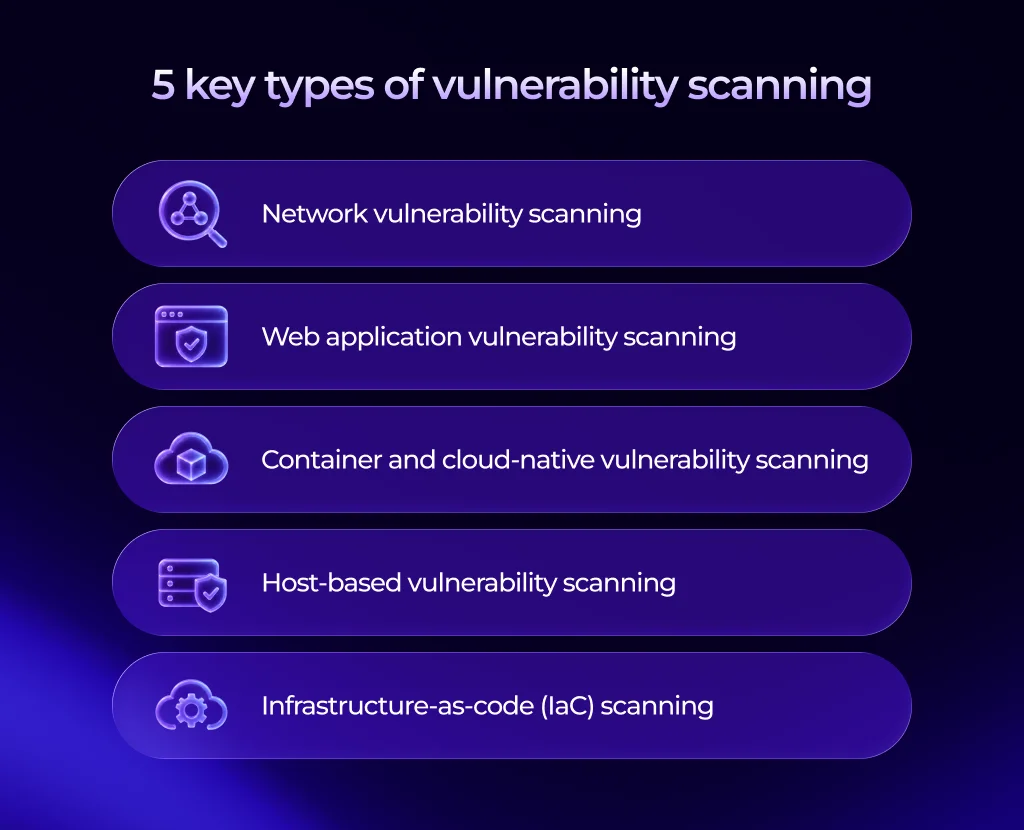
The 5 Main Types of Vulnerability Scanning
Vulnerability scanning is not limited to examining network devices or checking operating systems for missing patches. Modern IT environments contain different technologies, each with its own potential weaknesses.
A scanning program should therefore reflect the organization’s actual technology footprint. The following five types cover common areas that security teams need to assess.
1. Network Vulnerability Scanning
Network vulnerability scanning examines network devices, services, and infrastructure to identify weaknesses that could expose systems to unauthorized access.
It typically checks for:
- Open ports and exposed services.
- Outdated network software and firmware.
- Unpatched network devices.
- Weak or deprecated communication protocols.
- Insecure service configurations.
2. Web Application Vulnerability Scanning
Web application vulnerability scanning examines websites, web applications, and APIs for security weaknesses that could affect application functionality or expose sensitive information.
Depending on the tool and scan configuration, it can identify common application-layer vulnerabilities such as:
- SQL injection.
- Cross-site scripting (XSS).
- Insecure security headers.
- Weak authentication configurations.
- Known vulnerabilities in application components.
3. Container and Cloud-Native Vulnerability Scanning
Organizations increasingly deploy applications using containers and cloud-native infrastructure. These environments introduce security considerations that traditional network and host scanning may not fully address.
Container and cloud-native scanning examines components such as:
- Container images and software packages.
- Container registries.
- Vulnerable base images and dependencies.
- Container runtime configurations.
- Cloud-native resource configurations.
4. Host-Based Vulnerability Scanning
Host-based scanning examines individual systems, including servers, workstations, and other computing devices.
It focuses on the operating system, installed applications, software versions, and system-level configurations.
Typical findings include:
- Missing operating system security patches.
- Outdated or vulnerable installed software.
- Unsupported operating system versions.
- Insecure local configurations.
- Known vulnerabilities affecting installed components.
5. Infrastructure-as-Code (IaC) Scanning
Infrastructure-as-code allows organizations to define and deploy infrastructure through configuration files and templates. Common examples include Terraform and AWS CloudFormation.
IaC scanning examines these files for insecure configurations before the infrastructure is deployed.
It can identify issues such as:
- Publicly exposed cloud storage.
- Overly permissive access policies.
- Insecure network configurations.
- Unencrypted storage settings.
- Excessive permissions assigned to cloud resources.
Vulnerability Scanning vs. Penetration Testing vs. Vulnerability Management
Vulnerability scanning, penetration testing, and vulnerability management are closely related, but they serve different purposes.
The terms are sometimes used interchangeably, which can create confusion when organizations define their security testing requirements. Understanding the distinction helps decision-makers select the right activities and avoid assuming that one can replace another.
Vulnerability Scanning vs. Penetration Testing
Vulnerability scanning uses automated tools to identify known weaknesses across systems and applications. It provides broad coverage and produces findings that security teams can review and prioritize.
Penetration testing takes a more adversarial approach. Security specialists attempt to exploit selected weaknesses within an agreed scope to determine whether they can be used to gain unauthorized access, move between systems, or reach sensitive information.
The key difference is the level of validation.
A vulnerability scanner may identify an outdated software component associated with a known vulnerability. A penetration tester investigates whether that weakness can be exploited in the actual environment and what an attacker could achieve.
Organizations need both activities for different reasons. Scanning supports ongoing visibility, while penetration testing provides deeper validation of selected systems and attack paths.
For a more detailed comparison, see our article on vulnerability assessment vs. penetration testing.
How Often Should You Run Vulnerability Scans?
There is no single scanning frequency that suits every organization. The appropriate cadence depends on factors such as asset exposure, system criticality, infrastructure changes, regulatory requirements, and the organization’s ability to respond to findings.
However, scanning should not be treated as an activity that happens only before an audit or after a security incident.
Scan Frequency Should Reflect Asset Exposure
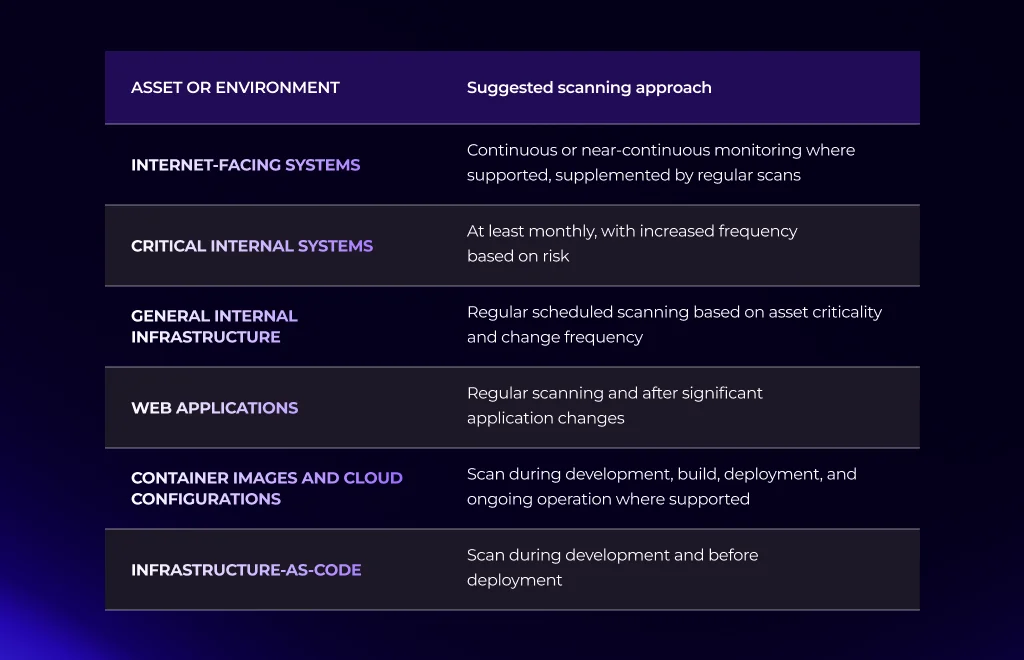
Internet-facing systems generally require more frequent monitoring because they are directly reachable from external networks. Public web applications, remote access services, and exposed infrastructure should be included in regular scanning schedules.
Internal systems also require routine scanning. Although they may not be directly accessible from the internet, weaknesses in internal servers, endpoints, and network devices can become relevant if an attacker gains access through another route.
Organizations can use the following guidance as a starting point:
Trigger Additional Scans When the Environment Changes
A calendar-based schedule alone may not provide sufficient coverage. Significant changes can introduce new weaknesses between scheduled scans.
Organizations should consider additional scans when:
- New servers, applications, or network services are deployed.
- Major infrastructure or application changes are introduced.
- A new high-severity CVE affects software used in the environment.
- Cloud resources or network configurations are modified.
- A security incident reveals potential weaknesses in affected systems.
For example, if a newly disclosed vulnerability affects a widely used web server, an organization should not necessarily wait until its next monthly scan to check whether the affected software is present. An out-of-cycle scan can help identify potentially vulnerable assets sooner.
Compliance Requirements Are a Baseline, Not the Entire Strategy
Some regulatory and industry standards specify minimum scanning frequencies. For example, PCI DSS includes requirements for recurring vulnerability scans of in-scope environments.
However, meeting a compliance schedule does not automatically mean that an organization’s scanning cadence is sufficient for its actual risk exposure.
A business operating critical internet-facing services may need more frequent scanning than the minimum required by a compliance framework. Security teams should therefore consider both compliance obligations and the speed at which vulnerabilities can affect their specific environment.
Choosing and Running an Effective Vulnerability Scanning Program
Selecting a vulnerability scanner is only one part of establishing an effective scanning program. Organizations also need to define what will be scanned, how findings will be reviewed, and who is responsible for remediation.
Without these elements, even advanced scanning tools can produce large volumes of findings without leading to meaningful risk reduction.
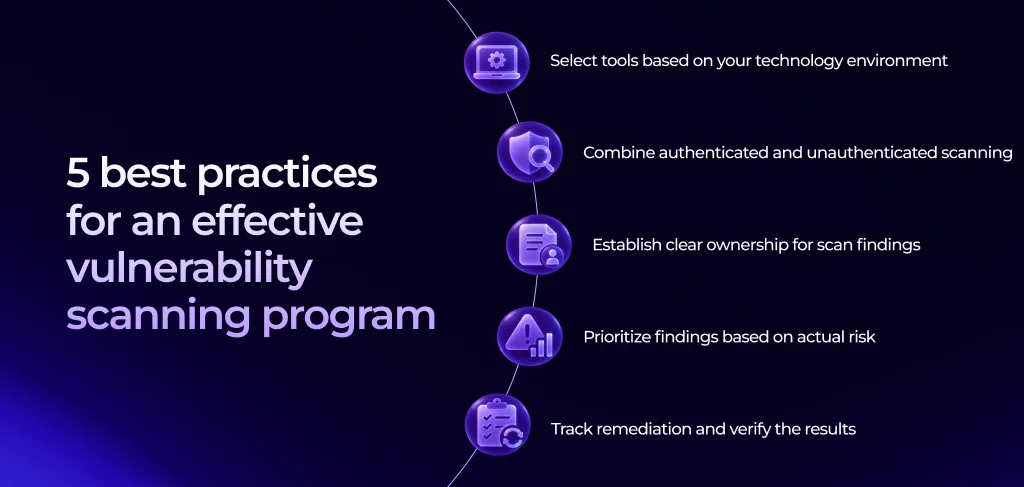
1. Select Tools Based on Your Technology Environment
Not every vulnerability scanner provides the same coverage. Some focus primarily on network infrastructure, while others specialize in web applications, cloud environments, containers, or software dependencies.
Before selecting a tool, organizations should identify the technologies they need to assess.
For example, a company operating traditional on-premises infrastructure may prioritize network and host-based scanning. A cloud-native organization may also need container image, cloud configuration, and IaC scanning.
The objective is to select tools that provide relevant coverage across the actual environment, rather than relying on a single scanner to assess every technology layer.
2. Combine Authenticated and Unauthenticated Scanning
A scanning program should account for both external and internal perspectives.
Unauthenticated scans help identify weaknesses visible to an external party, while authenticated scans provide deeper visibility into system configurations and installed software.
Using both methods helps reduce blind spots and gives security teams a more complete understanding of their exposure.
3. Establish Clear Ownership for Scan Findings
Every finding should have a defined path from detection to resolution.
Security teams need to determine who reviews scan results, who validates potential false positives, and which teams are responsible for remediation.
For example, a vulnerability affecting a production web server may require coordination between the security, infrastructure, and application teams. Without clear ownership, the finding can remain unresolved even after it has been identified.
4. Prioritize Findings Based on Actual Risk
Not every vulnerability requires the same response time.
Severity scores, such as the Common Vulnerability Scoring System (CVSS), provide a useful starting point for understanding technical severity. However, organizations should also consider whether the vulnerability is being actively exploited, whether the affected asset is internet-facing, and what business functions or sensitive data it supports.
A critical vulnerability on an exposed production system may require immediate attention. A vulnerability with the same severity score on an isolated test system may present a different level of organizational risk.
Prioritization should therefore combine technical severity with environmental context and potential business impact.
5. Track Remediation and Verify the Results
A vulnerability scanning program should not end when a report is generated.
After remediation, organizations need to verify that the identified weakness has been addressed. This may involve running another scan, reviewing configuration changes, or confirming that the affected software has been updated.
A useful vulnerability scan report should help teams understand:
- Which assets were scanned and what was included in the scope.
- Which vulnerabilities and configuration weaknesses were identified.
- The severity and supporting evidence for each finding.
- Which findings require immediate attention.
- Recommended remediation actions.
- The status of previously identified vulnerabilities.
Tracking these details over time helps organizations identify recurring weaknesses, monitor remediation progress, and assess whether their vulnerability management process is improving.
Conclusion
Vulnerability scanning gives organizations the visibility they need to identify security weaknesses across their IT environments. However, identifying vulnerabilities is only the first step. The real value comes from understanding which findings pose the greatest risk and ensuring they are addressed before they can be exploited.
An effective scanning program should cover the organization’s technology environment, combine authenticated and unauthenticated scanning, and follow a consistent schedule that reflects asset criticality and exposure. More importantly, scan results should feed directly into vulnerability prioritization, remediation, and verification.
As IT environments continue to evolve, organizations need more than occasional scans to maintain an accurate view of their security posture. They need a structured approach to identifying weaknesses and managing them over time.
Terralogic helps organizations strengthen this process through Threat and Vulnerability Management services that support vulnerability identification, risk assessment, and remediation planning. Talk with Terralogic’s cybersecurity experts to explore how your organization can build a more effective vulnerability scanning program.
Frequently Asked Questions (FAQs)
1. What Is Vulnerability Scanning?
Vulnerability scanning is an automated process that identifies known security weaknesses across systems, applications, networks, and infrastructure. It uses scanning tools to compare assets against vulnerability databases, such as CVE records, vendor advisories, and security configuration baselines. The results help organizations identify potential weaknesses and prioritize them for remediation.
2. What Are the Main Types of Vulnerability Scanning?
The five common types of vulnerability scanning are:
- Network vulnerability scanning: Identifies exposed ports, network services, and vulnerable network configurations.
- Web application vulnerability scanning: Examines websites, applications, and APIs for common application-layer weaknesses.
- Container and cloud-native scanning: Checks container images, registries, runtime environments, and cloud configurations.
- Host-based vulnerability scanning: Examines operating systems, installed software, and system configurations.
- Infrastructure-as-code scanning: Reviews deployment templates for insecure configurations before infrastructure is provisioned.
Organizations should select scanning methods based on their technology environments and security requirements.
3. What Is the Difference Between Vulnerability Scanning and Vulnerability Management?
Vulnerability scanning identifies potential security weaknesses using automated tools. Vulnerability management is the broader, continuous process of discovering assets, identifying vulnerabilities, prioritizing risks, coordinating remediation, and verifying that weaknesses have been addressed.
In other words, scanning provides the findings, while vulnerability management turns those findings into corrective action.
4. How Often Should You Run Vulnerability Scans?
Scanning frequency should depend on asset criticality, external exposure, infrastructure changes, and applicable compliance requirements.
Internet-facing and critical systems generally require more frequent scanning, while internal assets should also be assessed on a regular schedule. Organizations should additionally trigger scans after significant changes or when newly disclosed vulnerabilities affect their technology environment.
A quarterly scan may satisfy a specific compliance requirement, but higher-risk environments may need more frequent monitoring.
5. What Is the Difference Between Authenticated and Unauthenticated Vulnerability Scanning?
Authenticated scanning uses valid credentials to examine systems from within, allowing the scanner to identify internal weaknesses such as missing patches and insecure configurations.
Unauthenticated scanning examines systems without login credentials, showing what can be discovered or accessed from the scanner’s network position.
Both methods provide useful but different perspectives. Combining them helps organizations identify weaknesses that may not be visible through either method alone.