
Your SaaS platform has just landed its two-hundredth customer, and the product team wants every tenant to connect a custom domain to the shared Next.js frontend. Sales sees another onboarding milestone, but for the on-call engineer, each new domain brings another certificate to provision, configure, and renew. Managing TLS certificates manually may work for a handful of accounts, but it quickly becomes a recurring and error-prone task as the platform grows.
This is where Let’s Encrypt SSL automation on RKE becomes essential. Certificate provisioning should operate as part of the cluster infrastructure rather than depend on a support ticket or an engineer remembering to renew a certificate before it expires. cert-manager is a Kubernetes-native certificate controller that automates the certificate lifecycle, including requests, domain validation, issuance, and renewal, by managing certificates as Kubernetes custom resources.
When paired with the NGINX Ingress Controller and Let’s Encrypt’s ACME protocol on a Rancher Kubernetes Engine (RKE) cluster, cert-manager allows certificate management to follow a declarative workflow. When a tenant adds a domain, the platform can create the required Kubernetes resources and let cert-manager handle certificate issuance and renewal without manual intervention at each step.
This guide explains how to build that workflow for a multi-tenant Next.js application backed by a shared Python API. It covers cert-manager configuration, NGINX Ingress routing, wildcard and per-tenant certificate strategies, and the onboarding logic needed to route each tenant’s traffic to the appropriate application service.
Key takeaways
- cert-manager and a ClusterIssuer automate the Let’s Encrypt certificate lifecycle, reducing the need for manual renewal.
- The NGINX Ingress Controller handles TLS termination and routes tenant traffic through domain-specific Ingress resources.
- HTTP-01 validation works well for individual custom domains, while DNS-01 is required for wildcard certificates.
- An onboarding service can create the required Ingress and Certificate resources when a tenant registers a new domain.
- Monitoring certificate expiration and cert-manager health is as important as automating issuance because failed renewals can still lead to service disruption.
Architecture overview: cert-manager, NGINX Ingress, and RKE certificate management
A production certificate automation pipeline for a multi-tenant SaaS application relies on 4 main components, each responsible for a specific part of certificate management and application traffic routing:
- NGINX Ingress Controller: Sits at the edge of the RKE cluster, terminates TLS, and routes incoming HTTP and HTTPS traffic according to the request’s Host header.
- cert-manager: Runs within the cluster and uses its controller, webhook, and cainjector components to manage certificate resources and reconcile them against the configured issuer.
- ClusterIssuer: Defines how cert-manager communicates with Let’s Encrypt through the ACME protocol, including the ACME endpoint, domain validation method, and account key.
- Application services: A shared Next.js frontend serves the tenant-facing interface, while a Python backend, commonly built with FastAPI or Django, handles API requests. Both services can be exposed through the Ingress configuration for each tenant domain.
This architecture is particularly useful for RKE environments operating behind corporate load balancers or on-premises infrastructure, where DNS and network policies may be managed separately from the Kubernetes control plane. Keeping certificate management within cert-manager makes the workflow easier to inspect and maintain through standard Kubernetes tools and GitOps practices, rather than relying entirely on a load balancer’s proprietary TLS configuration.
How to automate Let’s Encrypt SSL certificates on RKE
Automating Let’s Encrypt SSL certificates on RKE involves installing cert-manager, configuring a ClusterIssuer to use Let’s Encrypt’s ACME endpoint, and associating tenant Ingress resources with that issuer. Once the configuration is in place, cert-manager can manage certificate requests and renewals as part of the cluster’s normal reconciliation process.
Start by installing cert-manager through its official Helm chart. The following command uses version v1.16.2 and enables the required custom resource definitions (CRDs).
|
Next, configure a ClusterIssuer that uses HTTP-01 validation. This method is a practical choice for individual tenant domains because it does not require DNS provider API credentials. Instead, Let’s Encrypt validates domain ownership by reaching a temporary challenge endpoint through the Ingress.
|
Replace the example email address with the address used by your platform team.
After applying the configuration, check whether the ClusterIssuer is ready:
|
Once the issuer reports Ready: True, an Ingress resource that carries the cert-manager.io/cluster-issuer annotation can trigger a certificate request. cert-manager then coordinates domain validation and issuance, provided the domain resolves correctly and the challenge endpoint is reachable.
Setting up SSL for multi-tenant Next.js applications
For a multi-tenant Next.js application, the usual approach is to create an Ingress resource for each custom domain while routing all tenant traffic to the same frontend Service. Each domain can reference its own TLS Secret, allowing certificate management to remain separate from the shared application deployment.
Because the Next.js frontend can serve multiple tenant domains from a single deployment, a new domain does not necessarily require a new application instance. Instead, the Ingress configuration identifies the hostname, references the corresponding certificate Secret, and directs requests to the shared nextjs-frontend-svc Service.
The following example shows the Ingress configuration for a tenant domain.
|
The host field identifies the tenant’s domain, while tls.secretName specifies the Kubernetes Secret that stores the certificate and private key. The issuer annotation tells cert-manager which ClusterIssuer to use, and the backend configuration routes application traffic to the shared Next.js Service.
The application still needs a way to identify the tenant associated with each request. Inside Next.js, middleware can read the incoming Host header and resolve it to a tenant ID, typically through a lookup table or a mapping cached in Redis. The application can then use that tenant context to scope database queries, asset paths, and other tenant-specific behavior.
This distinction is important for multi-tenant architecture: NGINX Ingress and cert-manager handle domain routing and TLS, while the application remains responsible for tenant identification and data isolation.
Automating HTTPS certificates in a Kubernetes RKE cluster
For platforms that use subdomains under their own root domain, a wildcard SSL certificate can simplify certificate management by covering multiple matching subdomains with a single certificate. This approach requires DNS-01 validation, which proves domain ownership through DNS records rather than an HTTP challenge.
A DNS provider with an API supported by cert-manager is needed to automate this process. Cloudflare, Route 53, and Google Cloud DNS are common options, depending on the platform’s DNS infrastructure.
Configuring the Cloudflare DNS-01 solver
The following ClusterIssuer configuration uses Cloudflare to complete DNS-01 validation for Let’s Encrypt.
|
The configuration specifies the DNS-01 solver and the Cloudflare API token Secret used to manage validation records. The referenced Secret must exist in the appropriate namespace and contain the token under the api-token key. The token should have only the permissions required to manage the relevant DNS records.
The dnsZones selector limits the solver to the specified zone, helping cert-manager select the appropriate validation method when multiple DNS providers or zones are configured.
Creating a wildcard SSL certificate
Once the DNS-01 issuer is ready, create a Certificate resource requesting coverage for both the root domain and its wildcard subdomains.
|
The dnsNames field specifies the domains covered by the certificate, while secretName identifies where cert-manager stores the issued certificate and private key. The issuerRef connects the request to the DNS-01 ClusterIssuer.
The configuration requests a 90-day certificate duration and sets a 30-day renewal window. cert-manager manages renewal according to the configured lifecycle and the validity period returned by the certificate authority.
A wildcard certificate only covers the specified domain pattern. For example, *.yourdomain.com can cover matching subdomains, but it does not cover a customer-owned domain outside that domain pattern. Platforms that support both their own subdomains and customer-owned domains will therefore often use wildcard and per-domain certificates side by side.
Let’s Encrypt cert-manager RKE tutorial: step-by-step setup
A typical Let’s Encrypt certificate automation setup on RKE involves five stages, from preparing the Ingress controller to verifying the certificate served to clients.
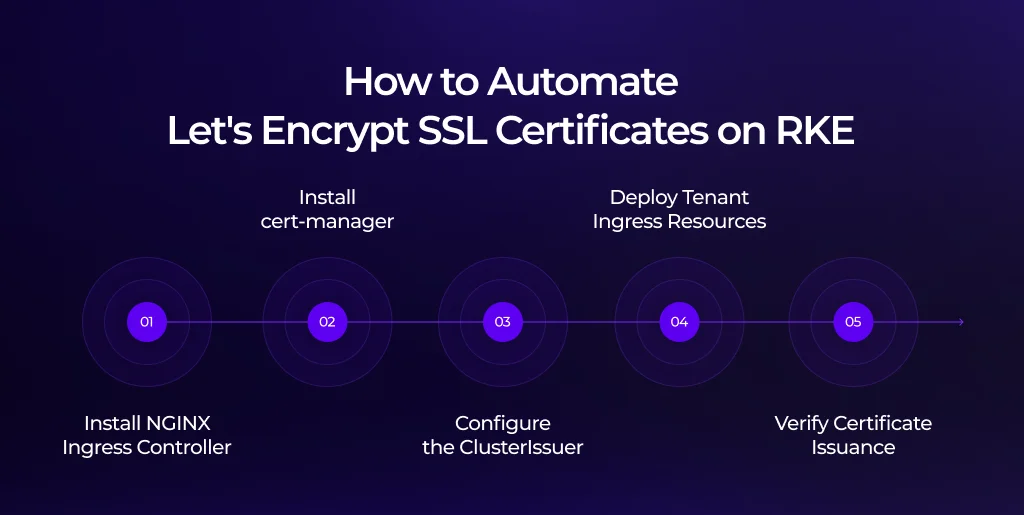
- Install the NGINX Ingress Controller on the RKE cluster using its Helm chart, exposing it through a LoadBalancer or NodePort according to the network environment.
- Install cert-manager and verify that the controller, webhook, and cainjector pods reach the Running state in the cert-manager namespace.
- Apply the appropriate ClusterIssuer configuration, using HTTP-01 for individual tenant domains or DNS-01 for wildcard certificates, and confirm that the issuer reports Ready: True.
- Deploy an Ingress resource for each tenant domain, including the cert-manager.io/cluster-issuer annotation and the correct tls.hosts and tls.secretName values.
- Check the CertificateRequest and Order resources to confirm issuance, then verify the certificate presented by the live domain.
To inspect certificate status directly, run:
|
These checks help distinguish between a certificate resource that has been created and a certificate that is successfully issued and served over HTTPS. If issuance does not progress, inspect the associated CertificateRequest, Order, issuer status, and cert-manager logs to identify the cause.
Multi-tenant SSL certificate automation: dynamic tenant onboarding
A scalable certificate workflow should connect tenant registration directly to Kubernetes resource creation. When a customer adds a custom domain, the platform should be able to generate the corresponding Ingress and certificate configuration through an onboarding service or CI/CD workflow, rather than relying on a manual kubectl apply.
One practical approach is to use a lightweight service that monitors the product database or a tenant custom resource for new custom-domain records. When a domain is registered and verified, the service generates the Kubernetes resources required to route traffic and initiate certificate issuance.
The following example uses the Python Kubernetes client to create an Ingress resource for a tenant domain.
|
This Ingress configuration routes /api requests to the shared Python backend and other requests to the Next.js frontend. Its issuer annotation also allows cert-manager to detect the certificate requirement and start the HTTP-01 issuance workflow.
The example illustrates the resource creation step rather than a complete production onboarding service. In a production environment, the workflow should also account for domain verification, existing resources, duplicate requests, Kubernetes API errors, and cleanup when a tenant removes a domain. The service must also have only the Kubernetes permissions needed to perform its assigned tasks.
Finally, the platform should verify that certificate issuance has completed and HTTPS is working before marking the tenant’s domain as active in the product database. This check connects infrastructure readiness to the customer onboarding experience and helps avoid activating domains that are not yet ready to serve traffic.
Best practices for production SSL certificate management
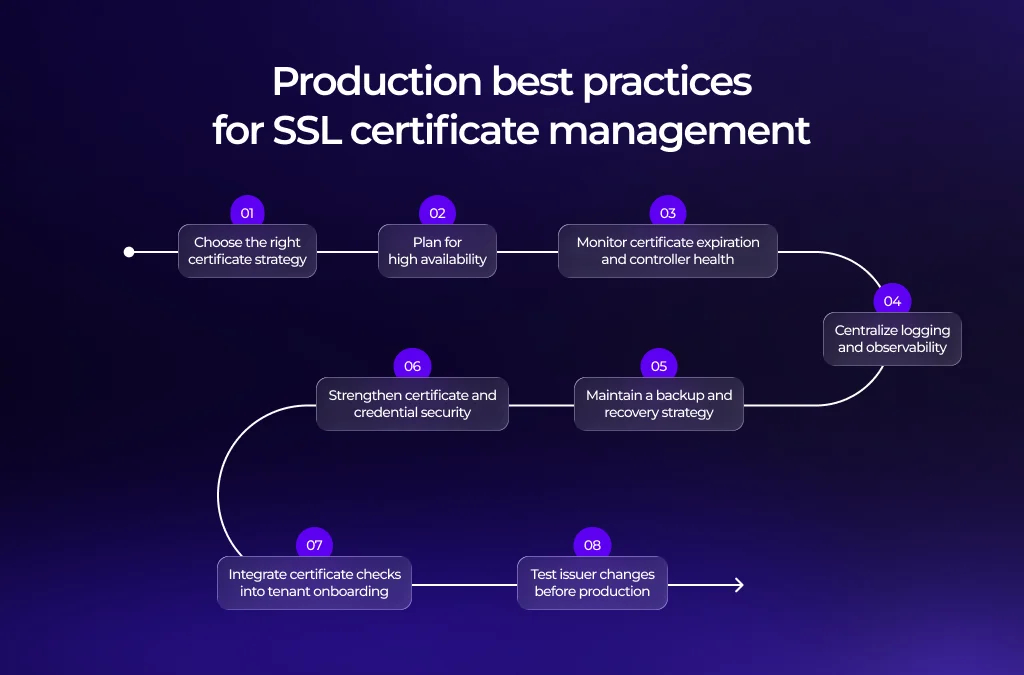
Automating Let’s Encrypt SSL certificates reduces repetitive work, but a production deployment still needs controls for certificate renewal, availability, security, and recovery. The following practices help make the certificate pipeline easier to operate as the number of tenant domains increases.
1. Choose the right certificate strategy
Use a DNS-01 wildcard certificate for the platform’s own root domain and matching subdomains. For customer-owned domains that cannot be covered by that wildcard, use individual certificates with a suitable validation method. Combining the two approaches accommodates different domain ownership models without requiring every tenant to follow the same process.
2. Plan for high availability
Consider running multiple replicas of the NGINX Ingress Controller and cert-manager controller across separate RKE nodes. Appropriate scheduling policies and a Kubernetes PodDisruptionBudget can help reduce disruption during node maintenance or upgrades.
High availability also depends on the surrounding infrastructure, including cluster health, network connectivity, DNS services, and access to the resources required for certificate issuance and renewal.
3. Monitor certificate expiration and controller health
Export cert-manager’s Prometheus metrics, including certmanager_certificate_expiration_timestamp_seconds, and configure alerts that give the team enough time to investigate potential renewal failures. Alerting thresholds should align with the certificate’s renewal policy and the team’s incident response requirements.
Monitoring should also cover cert-manager controller health, issuer readiness, and certificate issuance failures. Automated renewal does not remove the need for monitoring because DNS credential problems, ACME errors, or configuration changes can still interrupt the process.
4. Centralize logging and observability
Collect cert-manager controller logs and NGINX Ingress access logs in a centralized system such as Loki or ELK. Grouping events by tenant domain helps engineers correlate issuance failures, renewal activity, and TLS handshake errors across the cluster.
5. Maintain a backup and recovery strategy
Include relevant cert-manager Secrets and Certificate and ClusterIssuer manifests in the platform’s established Kubernetes backup process, using tools such as etcd backups or Velero where appropriate. Protect account keys and certificate private keys with suitable access controls, and make sure recovery procedures account for these sensitive resources.
6. Strengthen certificate and credential security
Apply least-privilege RBAC policies to cert-manager and the onboarding service. DNS-01 API tokens should be scoped to the required DNS permissions and stored securely. The NGINX Ingress Controller should also be configured to use appropriate TLS protocols and cipher suites in accordance with the organization’s security requirements.
7. Integrate certificate checks into tenant onboarding
Trigger Ingress and certificate configuration from the application’s tenant provisioning workflow, then verify HTTPS before activating the domain. This ensures that domain registration, infrastructure configuration, and application readiness are treated as connected stages of onboarding.
8. Test issuer changes before production
Validate new ClusterIssuer configurations against the Let’s Encrypt staging endpoint before switching to production. This is especially important during development and troubleshooting because repeated failed production requests can encounter ACME rate limits.
Conclusion
As a multi-tenant SaaS platform grows, manual certificate management becomes harder to sustain. Once customers begin bringing their own domains, TLS provisioning needs to be part of the platform infrastructure rather than another recurring task on the engineering team’s backlog.
The approach outlined in this guide combines cert-manager and the NGINX Ingress Controller on RKE with Let’s Encrypt’s ACME protocol. By selecting HTTP-01 or DNS-01 validation according to the domain requirements and integrating Ingress creation into tenant onboarding, teams can establish a more repeatable process for issuing and renewing certificates across their applications.
The result is a certificate workflow that requires less manual intervention and gives platform teams clearer visibility into issuance, renewal, and operational failures. Monitoring, secure credential handling, and readiness checks remain essential to ensure that automation continues to work as the platform and its customer base expand.
Terralogic’s platform engineering expertise supports organizations in building and maintaining the infrastructure behind reliable application delivery. Explore how Terralogic can help strengthen your platform automation and engineering practices.
Frequently asked questions (FAQs)
1. How do you automate Let’s Encrypt SSL certificates on RKE?
Install cert-manager, configure a ClusterIssuer for the Let’s Encrypt ACME endpoint, and annotate tenant Ingress resources with cert-manager.io/cluster-issuer. cert-manager can then manage domain validation, certificate issuance, and renewal according to the configured resources.
2. How do you set up SSL for a multi-tenant Next.js application?
Create an Ingress resource for each tenant domain and route it to the shared Next.js Service. Reference the appropriate TLS Secret and configure cert-manager to manage the certificate. The Next.js application can then resolve tenant identity from the incoming Host header.
3. What’s the difference between HTTP-01 and DNS-01 challenges?
HTTP-01 validates domain ownership through a temporary HTTP challenge endpoint and is commonly used for individual custom domains. DNS-01 validates ownership through DNS TXT records and is required for wildcard certificates because Let’s Encrypt does not issue wildcard certificates through HTTP-01.
4. Can cert-manager manage wildcard SSL certificates on RKE?
Yes. cert-manager supports wildcard certificates through DNS-01 validation when the configured DNS provider is supported and the required credentials are available. The certificate covers only the domain pattern specified in the Certificate resource.
5. How often does cert-manager renew Let’s Encrypt certificates?
Let’s Encrypt certificates in this workflow are valid for 90 days. cert-manager determines when renewal should begin based on the certificate’s validity period and renewal settings. Teams should still monitor certificate status and renewal failures to identify problems before a certificate expires.