


In this digital era, a need can become a weapon of mass destruction. Mobile devices have become the fifth basic need of human civilization. It is hard to imagine people without a mobile. Because each mobile has a fully functional application that runs a global economy. From social media interactions to financial transactions, people are using mobile applications. Applications like Instagram, GPay, Amazon, etc. are used continuously. Therefore, mobile application security has become a crucial aspect of protecting users from potential threats.
If the security of such applications is compromised, it can create havoc. These applications store users’ personal information that can be used in unimaginable ways. So, developers must put advanced security measures in place. If the application gets hacked, then a user’s trust is hard to get back. Many companies know this and take all the necessary precautions to strengthen their application security.
Today in this article, we are going to learn how your application is protected using different mechanisms.
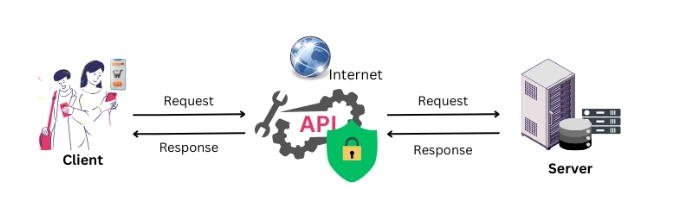 Communication plays a crucial role in fetching or transmitting data. The information exchanged between the app and server has to be private, especially when it is traveling over the internet. And this can be achieved by API security. A secure API will make sure your data is kept private and safe from bad factors.
You can achieve this security by:
Communication plays a crucial role in fetching or transmitting data. The information exchanged between the app and server has to be private, especially when it is traveling over the internet. And this can be achieved by API security. A secure API will make sure your data is kept private and safe from bad factors.
You can achieve this security by:
 Jailbreaking removes the Apple Store’s security layer, while rooting gives you access to control over the Android system. Jailbreaking or rooting your devices can cause potential harm to your operating system. They can bypass operating system restrictions, exposing devices to various threats.
What can you do to stay protected? Below are best practices and recommended ways to stay protected:
Jailbreaking removes the Apple Store’s security layer, while rooting gives you access to control over the Android system. Jailbreaking or rooting your devices can cause potential harm to your operating system. They can bypass operating system restrictions, exposing devices to various threats.
What can you do to stay protected? Below are best practices and recommended ways to stay protected:
7 Best practices for mobile application security
Let’s take a look at what different mechanisms and technologies are used for mobile application security.Advanced Authentication Mechanisms
Everything starts with authentication. Authentication is a key to your mobile application security. The most traditional method is protecting your application with a password. It will protect your application but can be bypassed. To further secure, more advanced authentication mechanisms are used, such as:- Two-Factor Authentication (2FA): It is a combination of your password with something you have (a device) to add an extra layer of security. In some applications, a security code would be sent to you by email or message.
- Biometric Authentication: Unique identifiers like fingerprints or facial recognition make unauthorized access significantly harder. Only you can access them.
- Token-Based Authentication: Cryptographic tokens replace passwords, ensuring credentials are not repeatedly transmitted.
Secure Communication Between App and Server
Communication plays a crucial role in fetching or transmitting data. The information exchanged between the app and server has to be private, especially when it is traveling over the internet. And this can be achieved by API security. A secure API will make sure your data is kept private and safe from bad factors.
You can achieve this security by:
- Using HTTPS to encrypt data in transit.
- Authenticating the app or user with API keys or OAuth tokens.
- Encrypting sensitive data before sending it.
- Validating inputs to protect the server from malicious attacks.
- Limiting requests to prevent abuse.
- Using secure headers to control who can access the API.
- Monitoring activity to spot and respond to potential threats.
Robust Session Management
A user session starts when a user uses any application. The session ends when users stop using it or the session times out due to inactivity. Mobile apps often maintain longer user sessions, which can be exploited if not managed securely. To keep it safe, implement the following:- Auto-Logout: Apply Auto-Logout to automatically terminate sessions after inactivity. This will prevent unauthorized access.
- Token-Based Sessions: Use secure tokens instead of device identifiers. Because they can be terminated, revised, or revoked at any time.
- Remote Sign-Out: This allows you to log out remotely from lost or stolen devices and protect your data.
- Encrypted Token Storage: Store session tokens in secure storage like Keychain (iOS) or Keystore (Android).
Securing Sensitive Data
When it comes to securing data, there are some key risks to watch out for. Think of it like having a safe at home where you lock up your valuable items to prevent anyone from taking them. In today’s world, strong data security isn’t just a nice to have; it’s essential! When you use an app, especially one that deals with personal or confidential information (like banking apps, messaging apps, or apps with private user details), it needs to store some of this data on your device or a server. If this data isn’t stored securely, hackers could access it and misuse it. Let’s dive into some best practices to keep your app’s data safe and secure:1. Use KeyChain/Keystore to store sensitive data
Storing your passwords or tokens anywhere else is like keeping your payment details under the doormat. For mobile platforms, KeyChain (iOS) or Keystore (Android) are like super-secure safes within your app. They’re specifically built to hold the really valuable stuff like encryption keys, passwords, or tokens.2. Only Store What’s Necessary
Suppose you’re moving to a new house. Do you pack everything, including old junk? Nope, you only take what’s necessary. It’s the same with data storage. Don’t keep unnecessary stuff on the device. Store data only when it’s crucial for your app’s functionality.3. Delete Data When You Don’t Need It Anymore
Temporary data is like leftovers in your fridge—it’s good for a while, but you don’t want it hanging around forever. If you’ve cached some data or used it temporarily, get rid of it when you’re done.4. Encrypt data, always!
Imagine sending a letter. Would you send it without an envelope? Probably not. If you do have to store data on a device, make sure it’s encrypted. Encryption is like that envelope, keeping prying eyes away from your message.Preventing Risks from Jailbreaking or Rooting
Jailbreaking removes the Apple Store’s security layer, while rooting gives you access to control over the Android system. Jailbreaking or rooting your devices can cause potential harm to your operating system. They can bypass operating system restrictions, exposing devices to various threats.
What can you do to stay protected? Below are best practices and recommended ways to stay protected:
- Avoid Rooting or Jailbreaking unless you fully understand the consequences.
- Block Rooted or Jailbroken Devices from accessing sensitive company networks to maintain security.
- Monitor for threats regularly. Companies should keep an eye on security events and network traffic to catch any unusual activity early.
Continuous Monitoring and Logging
In app security, logging and monitoring help to track what is happening within the application for detecting and preventing security threats. They help identify and respond to security incidents effectively. You can protect it by:- Log Only What’s Necessary: Avoid logging sensitive data like passwords or financial details.
- Monitor User Behavior: Detect unusual activity patterns that could indicate threats.
- Use Advanced Tools: Platforms like Splunk or Microsoft Sentinel provide real-time monitoring and insights.
How Do Logging and Monitoring Work Together?
- Logging gathers and stores security-relevant information, creating a historical record for review.
- Monitoring watches over these logs, identifying and reacting to potential threats in real-time.
Secure Your Code
When your code is secure, it’s harder for hackers to steal data, take control of the app, and compromise user trust. It’s about building a strong foundation so your app stays safe from potential threats. Writing code is like building a house with a security guard who keeps your belongings safe. This code will ensure if someone tries to break in, your app has defenses to secure data. Risk comes from using the wrong inputs, hardcoding sensitive data, using an insecure API, not handling errors and logs properly, using insecure third parties, or some other code-level issue. Importantly, this is not a piece of code running on the server; it is code running directly on a mobile device. Here are several ways to keep your mobile app code secure to mitigate risks. Think Like an Attacker: Think about how hackers might break your code and build code to defend against those attacks. Here are several ways to keep your mobile app code secure to mitigate risks.- Secure Authentication: Use 2FA or multi-factor authentication where possible. Even if someone guesses or steals a password, they would still need another verification step, like a fingerprint or one-time code.
- Limit Permissions: Give only the minimum permissions necessary for code to perform. Remove unnecessary access.
- Perform executed code analysis: You should ensure that static code analysis is regularly executed using some tools.
- Use automation to identify vulnerabilities: Automation tools such as analysis tools and vulnerability scanners can help to identify security issues that could be missed, like buffer overflows and memory leaks.
- Secure API Usage: Avoid sending sensitive data over an unencrypted connection (use HTTPs) and ensure that APIs are secure. This prevents “man-in-the-middle” attacks by blocking data interception and tampering.
- Secure Coding Practices: Obfuscate your code. Make your code hard to read if someone tries to reverse-engineer it. This doesn’t make it impossible to crack, but it adds an extra layer of difficulty to protect against injection attacks